Best BST/AU Selection Page
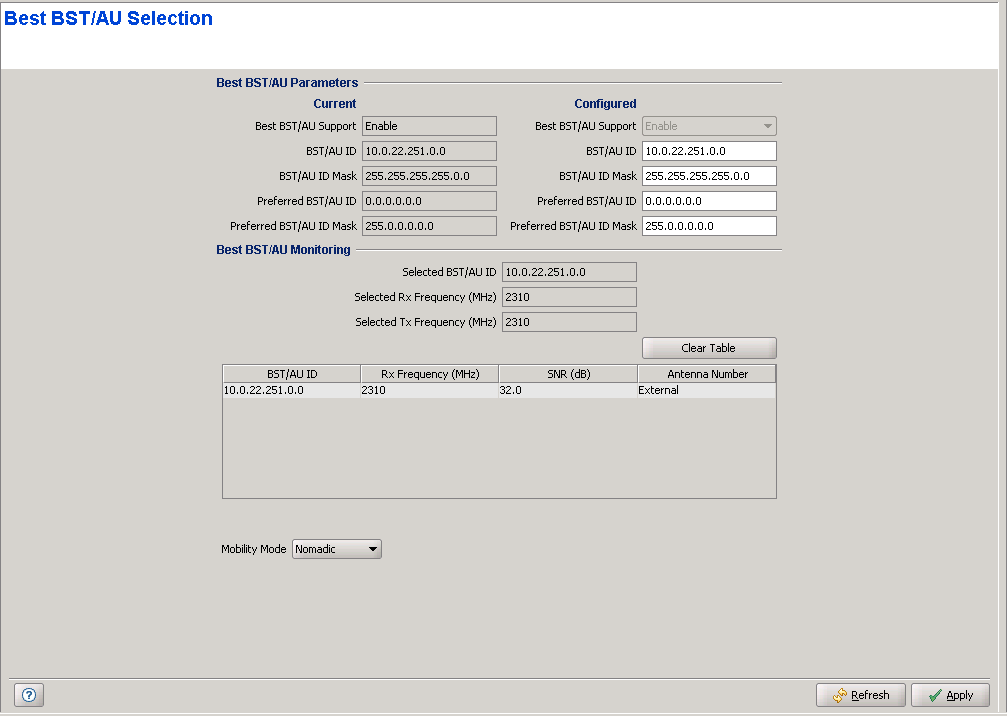
The Best BST/AU feature enables an SU to connect to the best AU/Micro Base Station in its neighborhood.
The SU scans all AUs/Micro Base Stations in a predefined range, in all frequencies (according to the frequencies defined in the "Frequency Scanning Page" ) and in all available antennas (according to the local definition in the SU, as indicated by the Antenna Selection parameter in the "SU Summary Page" ). Each of the AUs/Micro Base Stations with which the SU can communicate (perform initial phase of network entry) is given a quality mark based on the quality of the signal at which it is received by the SU. At the end of the scanning period, the SU reaches a Best AU decision according to the information gathered. The AU/Micro Base Station with the highest quality mark is selected as the Best BST/AU, and the SU will immediately try to associate with it at the relevant frequency.
The range used for scanning is defined by the BST/AU ID and BST/AU ID Mask parameters. The initial range can be limited by defining a preferred range of AUs/Micro Base Stations, and selecting the best AU/Micro Base Station in the preferred range. If no AU/Micro Base Station is found in the preferred range, the SU will scan the entire range.
After power-up or reset the SU waits for 60 seconds on the last used frequency to enable continued association with the same AU/Micro Base Station. If the previous AU is not found within 60 seconds the SU tries connecting with the next AU/Micro Base Station in the best AU table and so on. If no AU belonging to the best AU table is found the SU starts a full scan in accordance with the configured scanning parameters.
A Mobility Mode parameter enables supporting optimal performance after loosing connectivity to the AU/Micro Base Station according to the expected mobility of the SU: A Mobile SU is expected to move among different AU/Micro Base Station, while a Nomadic SU is typically stationary although it may also be moved to the coverage area of a different AU/Micro Base Station.
After loosing connectivity to the AU/Micro Base Station, a Nomadic SU waits for 5 minutes on the last used frequency to enable continued association with the same AU/Micro Base Station. If the previous AU/Micro Base Station is not found within 5 minutes the SU tries connecting with the next AU/Micro Base Station in the best AU table and so on. If no AU/Micro Base Station belonging to the best AU table is found the SU starts a full scan in accordance with the configured scanning parameters.
A Moblie SU behaves the same way after loosing connectivity to the AU/Micro Base Station, except that it waits only for 100 milliseconds on the last used frequency. This enables faster association with a new AU/Micro Base Station if necessary.
|
The Best BST/AU page includes the following components:
|
|

