Frequency Scanning Page
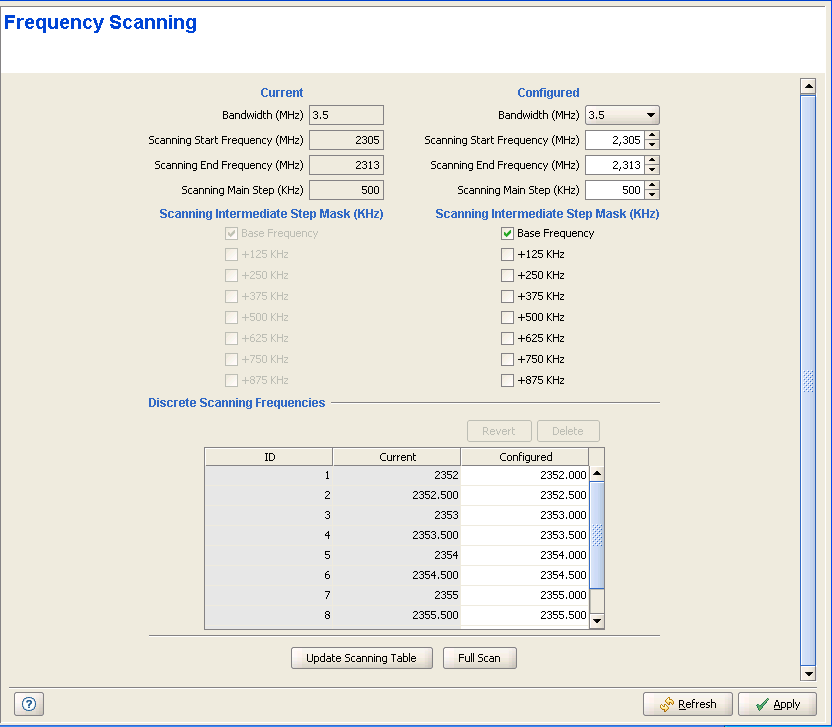
The Frequency Scanning page enables viewing and defining the frequencies to be used by the scanning process.
|
The Frequency Scanning page includes the following parameters:
Parameter |
Description |
Bandwidth (MHz) |
The frequency bandwidth used by the radio. The available options are: 1.75, 3.5, 5, 7 and 10 MHz. Values that are not supported will be rejected. |
Scanning Start Frequency
(MHz) |
The lowest Rx frequency to be used in the scanning process. |
Scanning End Frequency (MHz) |
The highest Rx frequency to be used in the scanning process. |
Scanning Main Step (KHz) |
Define the Main Frequencies that may be used in the scanning process: Start Frequency + N*Main Step, N=1, 2...until End Frequency is reached. For 2.x/3.x GHz units and a bandwidth of 3.5 MHz, the range is from 125 KHz to 1750 KHz, in steps of 125 KHz. For 2.x/3.x GHz units and a bandwidth of 5 MHz, the range is from 125 KHz to 5000 KHz, in steps of 125 KHz. The Main Step must be higher than the highest step defined by the Intermediate Step Mask. |
Scanning intermediate Step
Mask (KHz) |
Define the intermediate step frequencies to be included in the scanning process: • Base Frequency: If marked, add Start Frequency to the list of Main Frequencies. • 125 KHz: Include all Main Frequencies+125 KHz. • 250 KHz: Include all Main Frequencies+250 KHz. • 375 KHz: Include all Main Frequencies+375 KHz. • 500 KHz: Include all Main Frequencies+500 KHz. • 625 KHz: Include all Main Frequencies+625 KHz. • 750 KHz: Include all Main Frequencies+750 KHz. • 875/1250 KHz: Include all Main Frequencies+875/1250 KHz (875 is applicable for 3.5 MHz bandwidth. 1250 is applicable for 5 MHz bandwidth).
|
Discrete Scanning Frequencies (Current/Configured) |
Up to 10 discrete frequencies that are included in the scanning list. |
In addition, the following controls are available:
• Update Scanning Table: Click on the button to update the frequency scanning table in run time (without resetting the unit).
• Full Scan: Click on the button to initiate a full scanning process.
|
|

