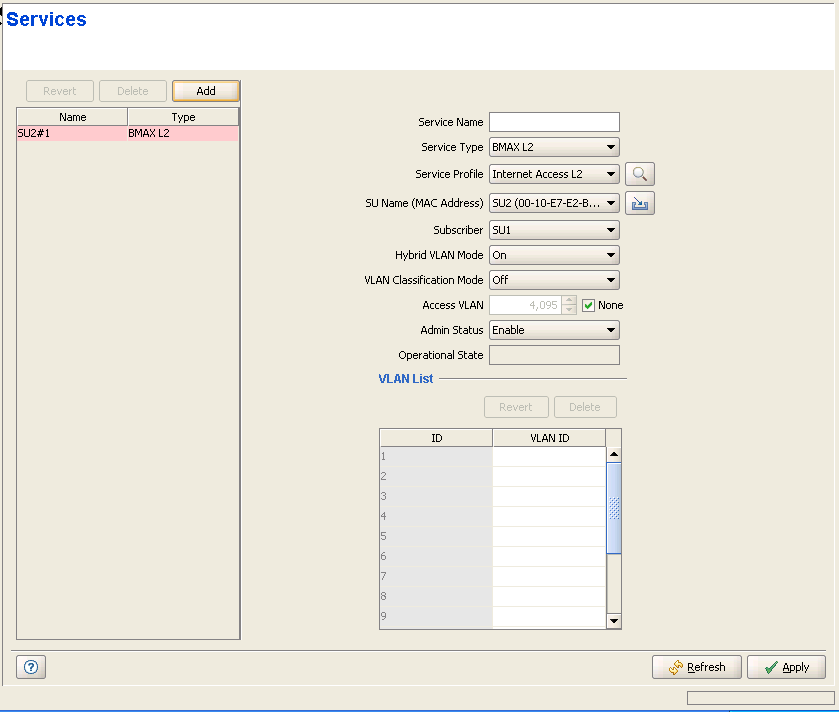
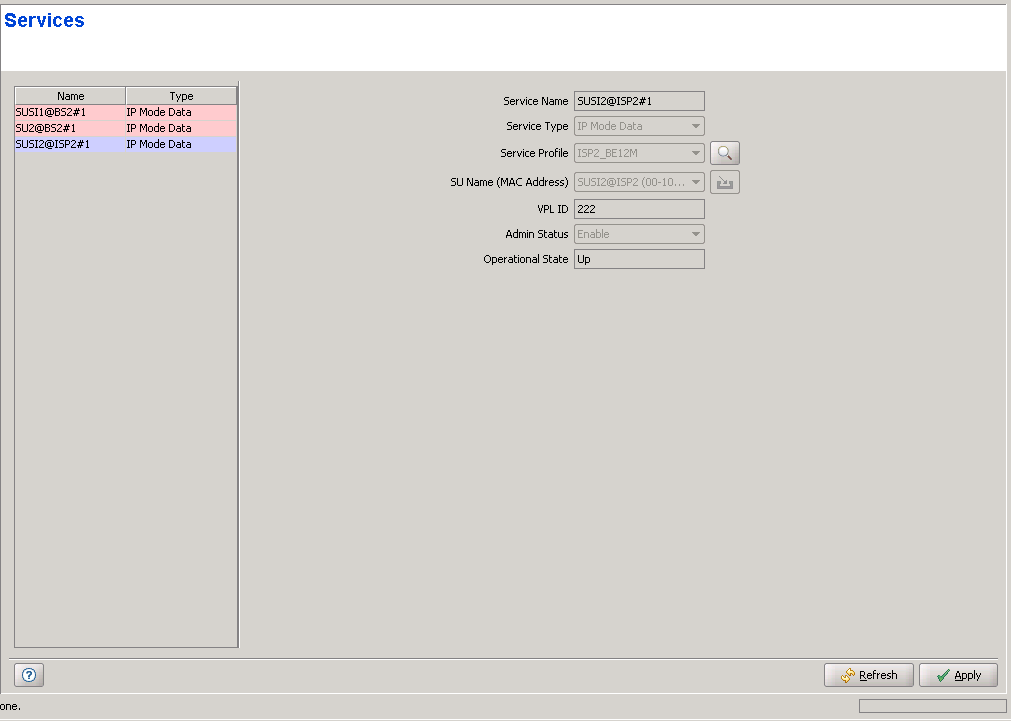
The Services page displays a list of all Services in the database of the device. In Ethernet CS Switching Mode it also enables modifying existing Permanent Services, deleting Permanent Services from the database of the device, and defining new Permanent Services. The device can hold up to a total of 4095 Services.
|
NOTE |
A Permanent Service is a Service defined in the device for a Permanent SU, and is applicable only in Ethernet CS Switching Mode. A Temporary Service can be granted to a Temporary SU by a RADIUS Authentication Server. In Ethernet CS Switching Mode a Temporary Service may also be granted by the Base Station (based on the Default Service Profiles) when a RADIUS server is not available, or when the SU is rejected by the RADIUS server, provided the device operates in Quick Service Mode and the SU uses the "quick" User Password "quickynikinyoky". A Temporary Service is given a default name of <SU Name>#<Number>. A Temporary Service cannot be defined, deleted or edited. |
|
|
The Services page comprises two sections: The Services Table (on the left side) and the Service Editor section (on the right side). The Editor is available only when either selecting a Service in the Services Table or adding a new Permanent Service.
The Services table provides the following details for each of the existing Services:
Parameter |
Description |
Name |
The Services Name. |
Type |
The Service Type: In Ethernet CS Switching Mode, the available types are L2, PPPoE or VoIP. In Micro Base Station, Managed VoIP Service Type is also available. In IP CS Switching Mode, the available types are IP Mode Data, IP Mode VoIP and IP Mode Managed VoIP. |
Temporary Services are displayed with a pink background.
|
To view the details of a Service: |
Select a Service's entry. The current Service configuration details will be displayed on the right side of the page.
|
To delete Permanent Service(s) from the device: |
Select one or several Service entries, click on the Delete button and then click Apply to remove the selected Service(s) from the database of the device. If you want to cancel the requested delete operation before clicking Apply, click on the Revert button.
|
To add a new Permanent Service: |
Click on the Add button. The Service Editor will be displayed on the right side of the page. To add a new Service to the database of the device, fill in the necessary parameters and click Apply.
|
To modify an existing Permanent Service: |
Select a Service's entry. The current Service configuration details will be displayed on the right side of the page, enabling modification of parameters. Click Apply to update the Service's configuration.
Service Configuration Parameters:
Parameter |
Description |
Name |
The Services Name. A Service Name consists of up to 32 printable characters. It is configurable only for "permanent" Services and must be unique per device. A Temporary Service is given a default name of <SU Name)>#<Number>. |
Service Type |
The Service Type: In Ethernet CS Switching Mode, the available types are L2, PPPoE or VoIP. In Micro Base Station, Managed VoIP Service Type is also available. In IP CS Switching Mode, the available types are IP Mode Data, IP Mode VoIP and IP Mode Managed VoIP. The Service Type of an existing Service cannot be modified. For Temporary Services, the Service Type is not configurable and it is in accordance with the Service Type in the Service Profile associated to the Service. |
Service Profile |
The Name of the Service Profile. Read-only for Temporary Services. For Permanent Services, the drop-down menu includes all Service Profiles with a matching Service Type that are available in the database of the device. Click on the Preview button (
Click on the Service Profile title (it will be colored blue when placing the cursor on it) to switch to the Service Profiles page. Refer to "Service Profiles Page" for more details on Service Profiles. |
SU Name (MAC Address) |
The Name and MAC Address of the
SU associated with the Service. Read-only for Temporary" Services. For
Permanent Services, the drop-down menu includes a list of the Names
and MAC Addresses of all permanent SUs in the database of the device. The selected SU can be modified only if the Admin Status of the Service is disabled. This is applicable only for Permanent Services. Click on the SU Name (MAC Address) title (it will be colored blue when placing the cursor on it) to switch to the Subscriber Units page. |
Subscriber |
Not applicable in IP CS Switching Mode. Applicable only to Permanent Services. The ID (Name) of the Subscriber to which the Service is allocated. The Subscribers drop-down menu includes all the Subscriber Names in the database of the device. The Subscriber of an existing Service cannot be modified. Click on the Subscriber title (it will be colored blue when placing the cursor on it) to switch to the Subscribers page. Refer to "Subscribers Page" for more details on Subscribers. |
VPL ID |
Applicable only in IP CS Switching Mode. A read-only parameter specifying the VLAN ID to be used by the Service. |
Hybrid VLAN Mode |
Not applicable in IP CS Switching Mode. Read-only for Temporary Services in Ethernet CS Switching Mode. Hybrid VLAN Mode of operation enables classification of both tagged and untagged packets or untagged packets only, according to the following rules: Hybrid VLAN Mode is Off and VLAN List is not empty: Only packets tagged with a VLAN ID that exists in the VLAN List will be forwarded. The VLAN List can include up to 16 entries. Hybrid VLAN Mode is Off and the VLAN List is empty: All (both untagged and tagged with any VLAN ID) will be forwarded. Hybrid VLAN Mode is On and VLAN List is not empty: Only untagged packets, and packets tagged with a VLAN ID that exists in the VLAN List, will be forwarded. The VLAN List can include up to 15 entries. Hybrid VLAN Mode is On and the VLAN List is empty: Only untagged frames will be forwarded. Note that for each Service Type, a maximum of one Service that enables forwarding of untagged packets can be assigned to an SU. Forwarding of untagged packets is supported when either Hybrid VLAN Mode is On, or Hybrid VLAN Mode is Off and the VLAN List is empty. It is not possible to define for the same SU two Services of the same Service Type that enable forwarding of untagged packets. However, the same SU can be associated with two Services of different Service Types that enable forwarding of untagged packets, provided one of them is a PPPoE Service (the combinations L2 and VoIP, L2 and Managed VoIP, VoIP and Managed VoIP are forbidden). |
VLAN Classification Mode |
Not applicable in IP CS Switching Mode. Read-only for Temporary Services in Ethernet CS Switching Mode. The VLAN Classification feature enables using VLAN ID (in addition to destination MAC address) for classification of transparent service downlink traffic before transmission to the destination MAC address. The VLAN Classification feature supports applications where multiple VLANs are associated with a single MAC address, allowing to assign different services to different VLANs. VLAN Classification Mode can be set to On only if the following conditions are met: The VLAN Transparency Mode of the applicable Service Profile is set to On. A single VLAN ID is defined for the Service. This means that the allowed combinations are: a) Hybrid VLAN Mode is Off and the VLAN List includes a single VLAN ID, or b) Hybrid VLAN Mode is On and the VLAN List is empty. All Services assigned to the same SU must be configured with the same VLAN Classification Mode (Either On or Off). |
Access VLAN |
Not applicable in IP CS Switching Mode. Read-only for Temporary Services in Ethernet CS Switching Mode. The Access VLAN parameter enables defining a VLAN ID to be used with untagged packets received on the Ethernet port of the SU. This parameter is applicable only for a transparent service (VLAN Transparency Mode is On) with Hybrid Mode set to On, or a transparent service with Hybrid Mode set to Off and an empty VLAN list. A tag with the defined Access VLAN will be added by the NPU/Micro Base Station to untagged packets in the uplink. The tag will be removed by the NPU/Micro Base Station from packets in the downlink. For a multicast connection, the NPU/Micro Base Station will send in addition to the VLAN list the single Access VLAN. The SU will be responsible to remove the Access VLAN if it is received on a multicast connection. The Access VLAN cannot be the same as the VPL ID in the applicable Service Profile(s). The range is from 0 to 4094 or None. |
Admin Status |
The administrative status of the Service. Configurable only for Permanent Services. |
Operational State |
A read-only display of the operational status. Up means that the Service is currently in use. |
VLAN List |
Not applicable in IP CS Switching Mode. Read-only for Temporary Services in Ethernet CS Switching Mode. A table of VLAN IDs listing the VLAN IDs behind the same SU associated with the applicable Subscriber. When Hybrid VLAN Mode is Off, the VLAN List can include up to 16 VLAN IDs. When Hybrid VLAN Mode is On, the VLAN List can include up to 15 VLAN IDs (the 16th entry is reserved for No VLAN). The maximum total number of VLAN IDs behind a single SU is 16. (15 when a Service with Hybrid VLAN Mode On is assigned to the SU). To avoid conflicts it is not allowed to define a VLAN ID that is identical to any VPL ID (applicable only for transparent Service Profiles). A specific VLAN ID behind a certain SU can be associated only with a single service of a certain service type. It is not possible to define two services of the same service type for the same SU and the same VLAN ID. The VLAN ID's value can be from 0 to 4094. |