Service Group Page
The Service Group page is applicable only in IP CS Switching Mode.
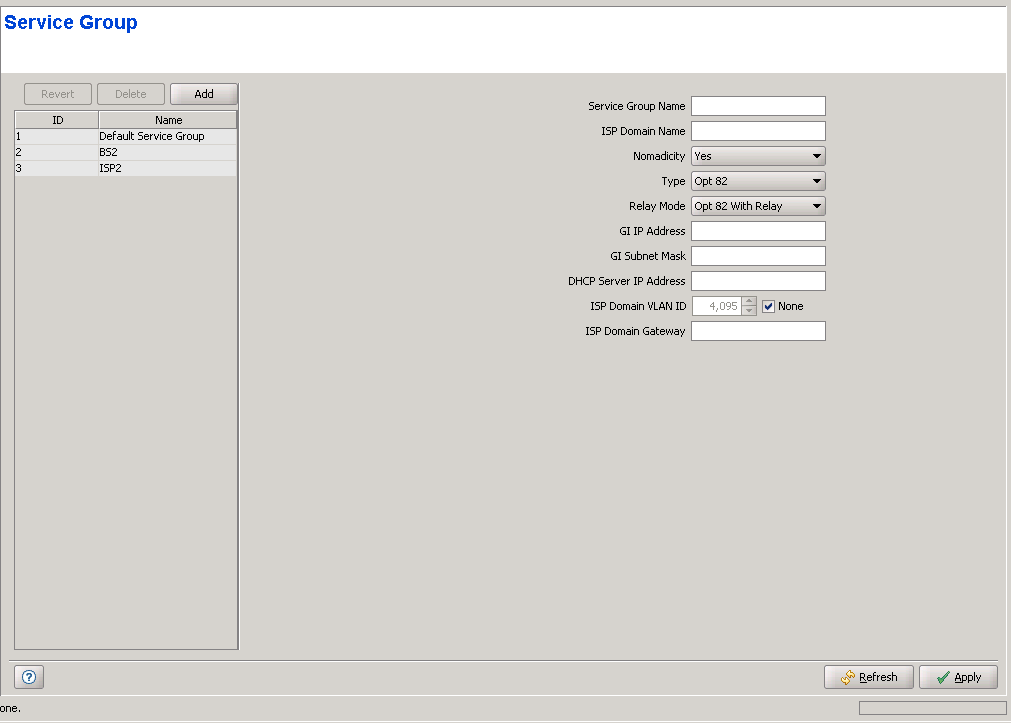
The Service Group page displays a list of all Service Groups in the database of the device. It also enables deleting Service Groups from the device, and defining new Service Groups. The parameters of an existing Service Group cannot be modified. The Service Group entity is applicable only to IP Mode Data Services, defining the parameters required for getting the necessary service from the relevant ISP. The device can hold up to 10 Service Groups.
|
The Service Groups page comprises two sections: The Service Groups Table (on the left side) and the Service Group Editor section (on the right side). The Editor is available only when either selecting a Service Group in the Service Groups Table for viewing/modifying its parameters, or adding a new Service Group.
The Service Groups table provides the Names associated with the existing Service Groups.

|
To view the details of a Service Group: |
Select a Service Group's entry. The current Service Group configuration details will be displayed on the right side of the page.
|
To delete Service Group(s) from the device: |
Select one or several Service Group entries, click on the Delete button and then click Apply to remove the selected Service Group(s) from the device. If you want to cancel the requested delete operation before clicking Apply, click on the Revert button.
|
To add a new Service Group: |
Click on the Add button. The Service Group Editor will be displayed on the right side of the page. To add a new Service Group to the database of the device, fill in the necessary parameters and click Apply.
Service Group Configuration Parameters:
Parameter |
Description |
Service Group Name |
The name of the Service Group. The Service Group Name comprises a string of 1 to 32 printable characters. |
ISP Domain Name |
The Domain Name of the ISP. Must be identical to the ISP Domain Name component in the User Name configured in the SU (<Name>@<ISP Domain Name>). An ISP Domain Name consists of up to 32 printable characters. |
Nomadicity |
The Nomadicity parameter allows locking the services provisioned to the SU to a specific Base Station. When Nomadicity is set to No both the Base Station (NPU) MAC address and the SU MAC address are used to identify the Calling Station ID in the communication with the RADIUS Authentication server, allowing to lock the services that can be provisioned to the SU to a specific Base Station. When Nomadicity is set to Yes only the SU MAC address is used in the Calling Station ID. |
Type |
The mode of communicating with a DHCP server for acquisition of IP configuration for the device connected to the SU: • Proxy (NPU acts as DHCP server) • Opt 82 (using DHCP option 82, with or without Relay) • Transparent (transparent communication with a DHCP server located belonging to an enterprise's network). |
Relay Mode |
Applicable only for Opt 82 mode. Affects the involvement in the NPU in the communication with the DHCP server. The available options are Opt 82 With Relay and Opt 82 Without Relay. |
GI IP Address |
The GI IP Address is applicable only for Option 82 With Relay mode. It defines the IP address of the Service Group interface to be used for communication with the DHCP server. |
GI Subnet Mask |
The GI Subnet Mask is applicable only for Option 82 With Relay mode. It defines the subnet mask to be used with the GI IP Address. |
DHCP Server IP Address |
he DHCP Server IP Address is applicable only for Option 82 With Relay mode. It defines the IP address of the DHCP server. |
ISP Domain VLAN ID |
The ISP Domain VLAN is applicable only for Option 82 With Relay Mode. It defines the VLAN used for ARPs and Pings to the GI IP Address and for ARP requests to the ISP Domain Gateway. Available values are in the range of 0 to 4094 or None (4095). |
ISP Domain Gateway |
The ISP Domain Gateway is applicable only for Option 82 With Relay Mode. It defines the IP address of the ISP Domain Gateway. |
|
|

