PF Performance Pag, Micro Base Statione
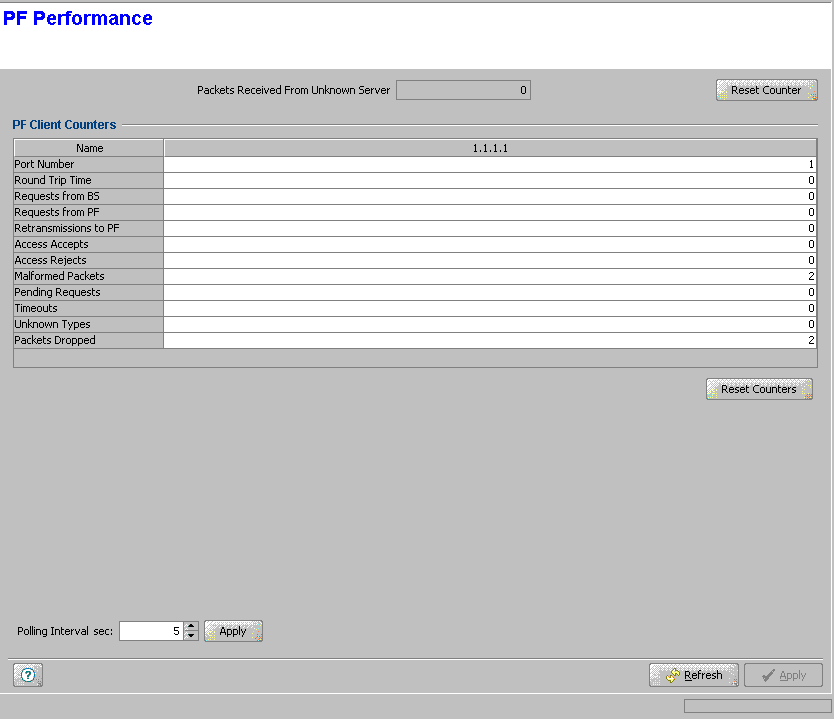
Micro Base Station PF Performance Page
The PF Performance page enables viewing and resetting various counters showing statistics of communication between the device and defined Policy Function servers.
|
The Packets Received From Unknown Server counter displays the total number of packets received from unknown servers(s) since the last reset.
The PF Client Counters table displays the following details for each of the Policy Function servers:
Parameter |
Description |
Server IP Address |
The IP address of the Policy Function server. |
Port Number |
The UDP port number used by the Policy Function server for receiving messages from the Micro Base Station. |
Round Trip Time |
The time interval (in milliseconds) between the most recent Access-Reply and the Access-Request that matched it from this server. |
Requests from BS |
The number of PF Access-Request packets sent to this server. This does not include retransmissions. |
Requests from PF |
The number of PF Access-Request packets sent from this server. |
Retransmissions to PF |
The number of PF Access-Request packets retransmitted to this server. |
Access Accepts |
The number of PF Access-Accept packets sent to this server. |
Access Rejects |
The number of PF Access-Reject packets sent to this server. |
Malformed Packets |
The number of malformed PF Access-Request packets received from this server. Malformed packets include packets with an invalid length. |
Pending Requests |
The number of PF Access-Request packets destined for this server that have not yet timed out or received a response. This counter is incremented when an Access-Request is sent and decremented due to receipt of an Access-Accept or Access-Reject, a timeout or retransmission. |
Timeouts |
The number of timeouts to this server that caused packets to be dropped. |
Unknown Types |
The number of packets of unknown type which were received from this server. |
Packets Dropped |
The number of PF packets which were received from this server and were dropped for any reason. |

|
To change the polling interval: |
The Polling Interval range is from 1 to 3600 seconds. Enter the required polling interval and click on the Apply button next to it.
|
To reset counters: |
Click on the Reset Counter button next to the Packets Received From Unknown Server(s) to reset this counter.
Click on the Reset Counters button below the PF Client Counters table to reset the applicable counters.
|
|

