Subscriber Units Page (modular Base Station, Ethernet CS Switching Mode)
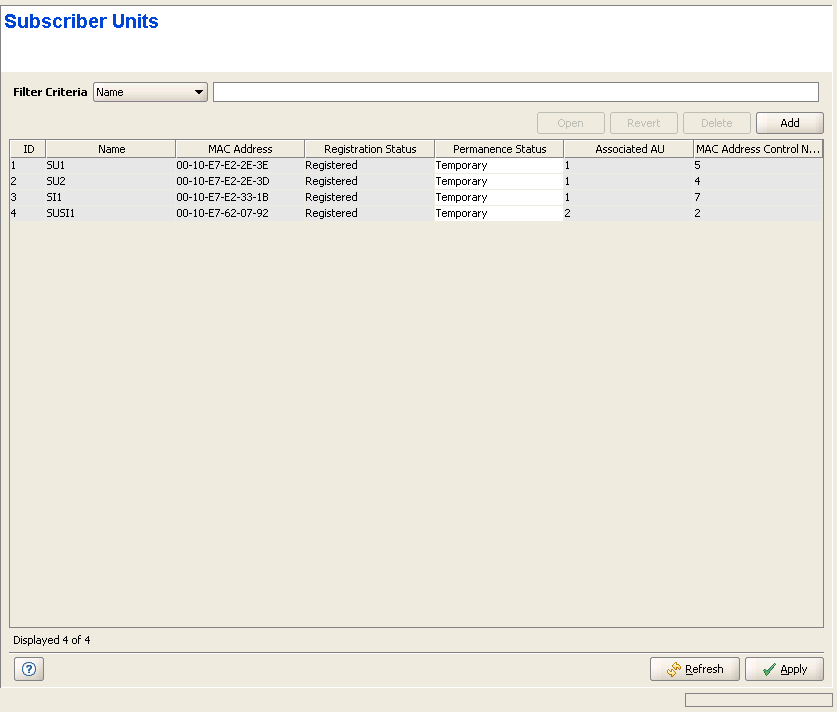
The Subscriber Units page displays general details on all Subscriber Units that are defined in the managed device. The list includes also registered temporary SUs.
|
The device may serve a very large number of Subscriber Units. To enable simpler and more efficient management of Subscriber Units, you can filter the list of displayed units according to selected criteria:

|
To filter the list of Subscriber Unit: |
1 Use the Filter Criteria drop-down menu to select the filtering criteria. The available options are Name, MAC Address, Registration Status, Permanence Status, Associated AU.
2 Use the text box/drop-down menu on the right side of the Filter Criteria selection menu as follows:
Filtering Criteria |
Description |
Name |
Start filling in the first characters of the Name(s) you are looking for. After entering each characters, the displayed table will be updated to display only the entries for SUs whose Name meet the current filtering criteria (start with the entered string). If the definition text box is empty, all SUs will be displayed. |
MAC Address |
Start filling in the first characters of the MAC Address(es) you are looking for. After entering each characters, the displayed table will be updated to display only the entries for SUs whose MAC address meet the current filtering criteria (start with the entered string). If the definition text box is empty, all SUs will be displayed. |
Registration Status |
Select the required status (Authenticated, Registered, Not Registered) in the drop-down menu. Only SUs whose status is the selected one will be displayed. |
Permanence Status |
Applicable only in Ethernet CS Switching Mode. Select the required status (Permanent or Temporary) in the drop-down menu. Only SUs whose status is the selected one will be displayed. |
Associated AU |
Not applicable for a Micro Base Station. Type in the required AU Slot Number (1-4, 7-9) to display only SUs associated with the selected AU. Type in "N" to display only SUs that are not associated with any AU. Leave the text box empty to view all SUs. |
The Subscriber Units table includes the following details for each SU:
Parameter |
Description |
Name |
The SU's Name. |
MAC Address |
The SU's MAC Address. |
Registration Status |
The registration status of the SU: Registered (connected) or Not Registered. |
Permanence Status |
The Permanence Status of the SU: Permanent or Temporary. Applicable only in Ethernet CS Switching Mode (In IP CS Switching Mode the Permanence Status is always Temporary). In Ethernet CS Switching Mode the Permanence Status in the Subscriber Units table is configurable. A non-registered SU whose status has been changed to Temporary will be deleted from the table (and from the database of the device). |
Associated AU |
Not applicable for a Micro Base Station. The slot number of the AU with which the SU is associated, or None for an SU that is not-registered. |
MAC Address Control Number |
A number computed from the MAC Address that can be used for verification purposes. |
|
To configure a selected SU: |
Select a registered SU's entry and click on the Open button, or double-click on a selected entry to open the Device Manager for the selected SU.
|
To remove a selected SU from the database (applicable only in Ethernet CS Switching Mode): |
Select an SU's entry and click on the Delete button (not available if the managed device operates in IP CS Switching Mode) to remove the SU from the database of the device. Only disconnected (Not Registered) SUs can be deleted.
|
To add a new SU (applicable only in Ethernet CS Switching Mode): |
Click on the Add button (not available if the managed device operates in IP CS Switching Mode) to add a new SU to the database of the device. The SU will be added as Permanent.
|
|

