Outdoor Units Page (modular Base Station)
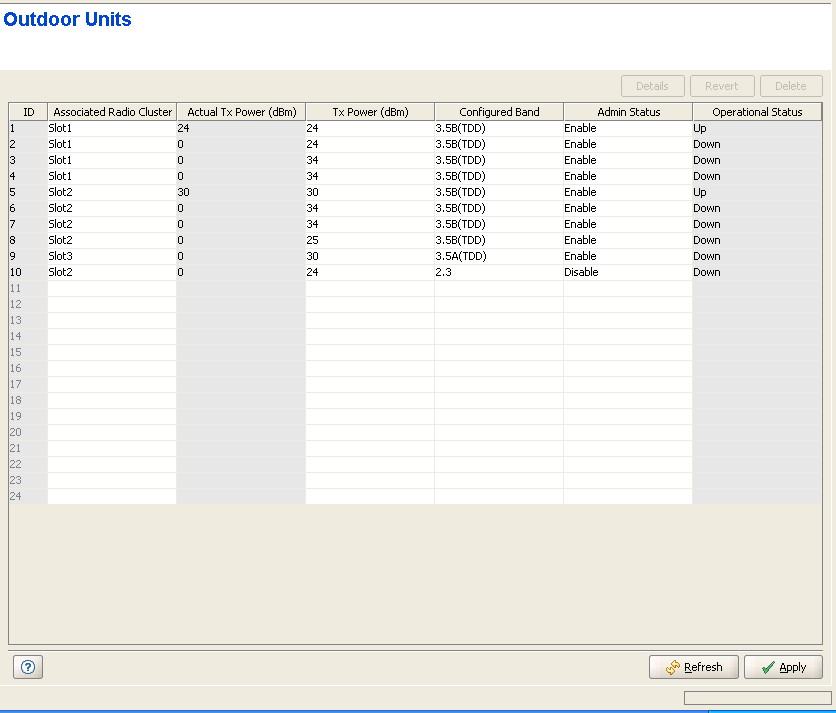
The Outdoor Units page enables viewing and configuring the parameters of all available Outdoor Units (ODUs).
The ODU(s) must be defined prior to defining the relevant AU(s) and Channel(s).
|
The Outdoor Units table includes the following parameters:
Parameter |
Description |
ID |
A read-only display of the Outdoor Unit's ID, which is a number used to identify the ODU. The range is from 1 to 24 in a modular Base Station, or 1 to 4 in a Micro Base Station. |
Associated Radio Cluster |
The Name of the Associated Radio Cluster. The selection list includes all defined Radio Clusters. |
Actual Tx Power |
The actual Tx power of the ODU. See details in Tx Power below. |
Tx Power |
The power level of the transmitted signal at the antenna port of the ODU. The range is from 0 to 50 dBm, using a 1 dBm resolution. In case the entered value is not compatible with the installed ODU, a trap will be issued. If the entered value is below the minimum supported by the ODU the actual power will be set to the minimum supported by the unit. If the entered value is above the maximum supported by the ODU, the power will be changed to the maximum value supported by the ODU. Note that the displayed value is the configured value which may differ from the actual value. The Tx Power of a connected ODU can be changed only if the Admin Status of the associated channel is disabled. If the Diversity Mode of the AU/Micro Base Station to which the ODU is connected is set to any of the Fourth Order Diversity modes, the Tx Power of the ODUs associated with Channels 2-4 cannot be changed. After enabling the Admin Status of Channel 1, the Tx Power of the ODUs associated with Channels 2-4 will be forced to the value configured for the ODU associated with Channel 1. If the Diversity Mode of the AU/Micro Base Station to which the ODU is connected is set to Second Order Diversity, the Tx Power of the ODU associated with Channel 2 cannot be changed. After enabling the Admin Status of Channel 1, the Tx Power of the ODU associated with Channel 2 will be forced to the value configured for the ODU associated with Channel 1. Channels 3 and 4 are not used in Second Order Diversity Mode. |
Configured Band |
The Configured ODU Frequency Band can be modified through the use of Frequency Bands Configuration file. The available values are the bands from the displayed list of available Frequency Bands. The Configured ODU Frequency Band can be updated only if the ODU is not associated with any Channel, or if the Admin Status of the associated Channel is Disabled. Compatibility between the Configured ODU Frequency Band and its actual band is verified by the AU/Micro Base Station upon trying to associate the ODU with a Channel. If the Configured ODU Frequency Band differs from the actual band supported by the ODU, a mismatch trap will be sent by the AU/Micro Base Station upon trying to associate it with a Channel and the association will be rejected. |
Admin Status |
The transmit on/off status of the ODU. The available options are Enable and Disable. |
Operational Status |
A read-only display of the ODU's operational status. |
Click on the Details button to open the HW Details window, displaying additional information on a selected ODU. The displayed details include:
• Card Serial Number
• Main Card HW Revision
• Main Card HW Configuration
• HC08 Version
• CPLD Version
• Temperature (Celsius)
• Max Tx Power (dBm): The maximum Tx Power supported by the ODU. This parameter sets the upper limit for the actual Tx Power parameter.
• ODU status Mask (Hex): A bit mask indicating the alarm status of the ODU. A mask of 00-00-00-00 indicates a no alarm condition. For details on possible alarm conditions and corrective actions refer to the System Manual.
• Rx Cable Loss (dB): The measured loss in dB of the IF cable connecting the ODU to the AU/Micro Base Station. The Rx Cable Loss should not exceed 10 dB.
• Connected AU Slot No (Applicable only for a modular Base Station).
• Channel
|
|

