Channels Page
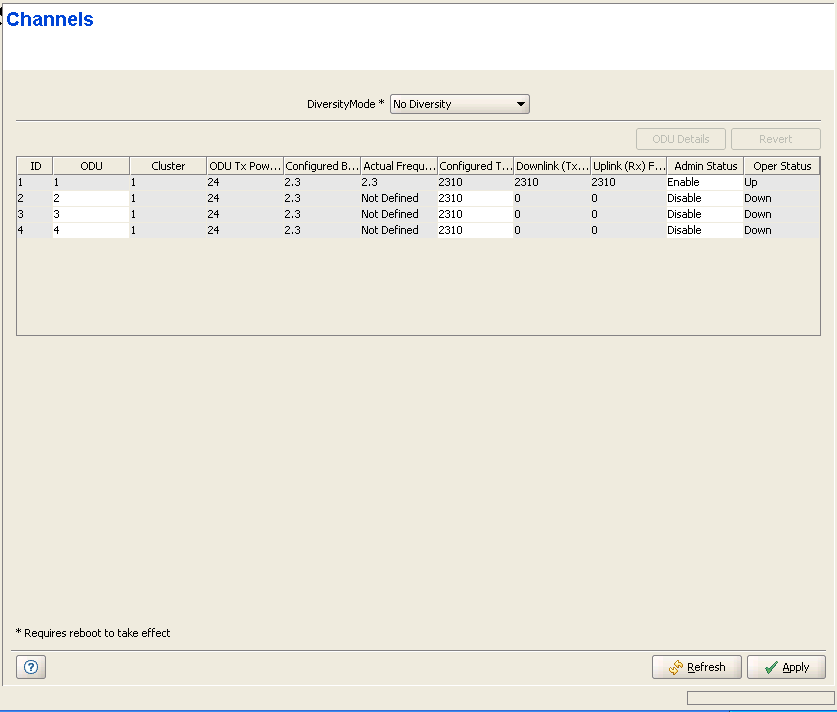
The Channels page enables viewing and configuring the Diversity Mode of the AU/Micro Base Station and the parameters of the AU/Micro Base Station Channels.
|
Diversity Mode: The Diversity Mode of the AU/Micro Base Station. The available options are:
• No Diversity
• Second Order Diversity
• Fourth Order Diversity for NLOS
• Fourth Order Diversity for LOS and NLOS
Each of the Fourth Order Diversity modes uses a different downlink diversity scheme optimally adapted to the different propagation conditions prevailing in the relevant deployment scenario. Fourth Order Diversity for NLOS should typically be used when all or most of the SUs operate in Non-Line-Of-Sight (NLOS) conditions (typical to CPE Si units). Fourth Order Diversity for LOS and NLOS mode will provide better overall performance in deployments where there are SUs operating in both Line-Of-Sight (LOS) conditions (expected for most CPE-PRO S units) and Non-Line-Of-Sight (NLOS) conditions.

|
NOTE |
A change in the Diversity Mode parameter takes effect immediately and automatically resets the AU/Micro Base Station. It also disables the Admin Status of all its channels when changing from No Diversity to Second Order/Fourthe Order Diversity and vice versa. When changing from Fourth Order Diversity to Second Order Diversity, it disables the Admin Status of Channels 3 and 4. |
The Channels table has four entries for Channels 1 to 4. The Channels table include the following parameters for each Channel:
Parameter |
Description |
ODU |
An ODU ID (1-24 for a modular Base station, 1-4 for a Micro Base Station) of an already defined ODU. |
Cluster |
A read-only display of the Associated Radio Cluster configured in the associated ODU. |
ODU Tx Power |
A read-only display of the Tx Power configured in the associated ODU |
Configured Frequency Band |
A read-only display of the Configured Frequency Band in the Associated ODU. |
Actual Frequency Band |
A read-only display of the actual Frquency Band of the ODU. |
Configured Tx Frequency |
The Tx frequency in MHz, which must be in accordance with the Bandwidth for the AU/Micro Base Station and the rules defined in the Frequency Bands File (see "Frequency Bands File Page" ) for the frequency band selected as the Configured Band of the associated ODU. In addition, the following rules must be followed if the Diversity Mode is No Diversity: • After configuring the Tx Frequencies
f1 for one of the Channels, the Tx Frequencies for other Channel of
the same AU/Micro Base Station should be configured using increments
of +/- 0.875 MHz from the defined frequency: • The Tx Frequencies of all Channels of the same AU/Micro Base Station should belong to the same Frequency Bands Group (see "Frequency Bands File Page" ). If the Diversity Mode is set to any of the Fourth Order Diversity modes, the Tx Frequencies of Channels 2-4 are not configurable: when the Admin Status of Channel 1 is enabled, The Configured Tx Frequency of Channels 2-4 is are set automatically to the same value configured for Channel 1. If the Diversity Mode is set to Second Order Diversity, the Tx Frequency of Channel 2 is not configurable: when the Admin Status of Channel 1 is enabled, The Configured Tx Frequency of Channel 2 s are set automatically to the same value configured for Channel 1. Channels 3 and 4 are not used in Second Order Diversity Mode. |
Downlink (Tx) Frequency (MHz) |
A read-only display of the actual Downlink Frequency in MHz. |
Uplink (Rx) Frequency (MHz) |
A read-only display of the Uplink Frequency in MHz, computed from the Tx Frequency according to the Duplex Separation of the applicable Frequency Band. For TDD the Uplink (Rx) Frequency is identical to the Downlink (Tx) Frequency. |
Admin Status |
The administrative status of the Channel. Note that the Admin Status must be disabled to enable changes in the Configured Frequency Band of an associated ODU. If the Configured Frequency Band differs from the actual band supported by the ODU, a mismatch trap will be sent by the AU/Micro Base Station upon trying to associate it with a Channel and the association will be rejected. The Admin Status of all Channels belonging to the same AU/Micro Base Station must be disabled to allow a configuration change in the Bandwidth parameter. If the Diversity Mode is set to any of the Fourth Order Diversity modes, the Admin Statuses of Channels 2-4 are not configurable: they are set automatically to the same value configured for Channel 1. If the Diversity Mode is set to Second Order Diversity, the Admin Status of Channel 2 is not configurable: it is set automatically to the same value configured for Channel 1. Channels 3 and 4 are not used in Second Order Diversity Mode. |
Oper Status |
A read-only display of the operational status of the Channel. |
|
|

