Service Profiles Page
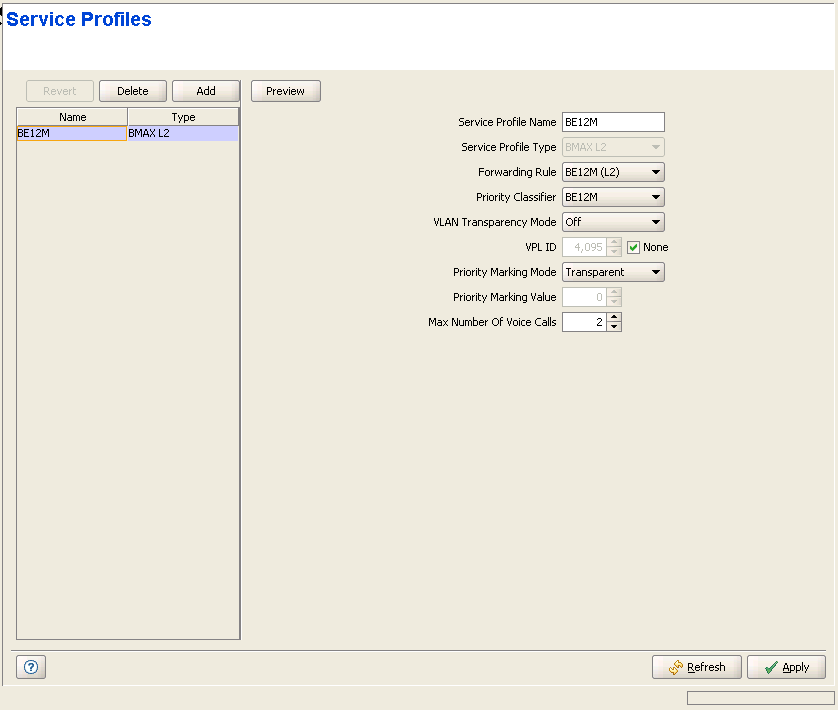
The Service Profile page enables viewing all Service Profiles in the device's database, defining new Service Profiles, editing details of existing Service Profiles and removing Service Profiles from the database of the device.
|
The Service Profiles page comprises two sections: The Service Profiles Table (on the left side) and the Service Profile Editor section (on the right side). The Editor is available only when either selecting a Service Profile in the Service Profiles Table for viewing/modifying its parameters, or adding a new Service Profile.
The Service Profiles table provides the following details for each of the existing Service Profiles:
Parameter |
Description |
Name |
The Service Profile Name. |
Type |
The Service Profile Type: L2, PPPoE or VoIP. |

|
To view the details of a Service Profile: |
Select a Service Profile's entry. The current Service Profile configuration details will be displayed on the right side of the page. You can click on the Preview button to view the parameters of all elements of the Service Profile (Forwarding Rule, Priority Classifier and the relevant QoS Profiles).
|
To delete Service Profile(s) from the device: |
Select one or several Service Profile entries, click on the Delete button and then click Apply to remove the selected Service Profile(s) from the Base Station/Micro Base Station. If you want to cancel the requested delete operation before clicking Apply, click on the Revert button.
|
To add a new Service Profile: |
Click on the Add button. The Service Profile Editor will be displayed on the right side of the page. To add a new Service Profile to the database of the Base Station/Micro Base Station, fill in the necessary parameters and click Apply. You can click on the Preview button to view the parameters of all elements of the Service Profile (Forwarding Rule, Priority Classifier and the relevant QoS Profiles) before applying the change.
|
To modify an existing Service Profile: |
Select a Service Profile's entry. The current Service Profile configuration details will be displayed on the right side of the page, enabling modification of parameters. Click Apply to update the Service Profile's configuration. You can click on the Preview button to view the parameters of all elements of the Service Profile (Forwarding Rule, Priority Classifier and the relevant QoS Profiles) before applying the change.
Service Profile Configuration Parameters:
Parameter |
Description |
Service Profile Name |
A Service Profile Name consists of up to 32 printable characters. |
Service Profile Type |
The Service Type: L2, PPPoE or VoIP. The Service Type of an existing Service Profile cannot be modified. |
Forwarding Rule |
The Forwarding Rule used by the Service Profile. The Forwarding Rule parameter is not applicable to transparent Service Profiles (VLAN Transparency Mode On), as all transparent Service Profiles share the same pre-defined Forwarding Rule (@@Transparent@@). The drop-down menu includes all Forwarding Rules with a matching Service Type that are available in the database of the Base Station/Micro Base Station: For L2 and VoIP Service Profiles all available L2/VoIP Forwarding Rules will be included, and for PPPoE Service Profiles all available PPPoE Forwarding Rules will be included. Place the cursor on the Forwarding Rule title (it will become blue) and click to open the Forwarding Rules page, displaying the detailes of the currently selected Forwarding Rule. Refer to "Forwarding Rules Page" for more details on Forwarding Rules. |
Priority Classifier |
The Priority Classifier used by the Service Profile. The Priority Classifier parameter is not applicable to VoIP Service Profiles. The drop-down menu includes all Priority Classifiers that are available in the database of the Base Station/Micro Base Station. Place the cursor on the Priority Classifier title (it will become blue) and click to open the Priority Classifiers page, displaying the detailes of the currently selected Priority Classifier. Refer to "Priority Classifiers Page" for more details on Priority Classifiers. |
VLAN Transparency Mode |
The VLAN Transparency Mode defines the method of transferring packets to the operator's upstream network. When set to Off, the specified VPL ID will be added to data packets sent from the Base Station/Micro Base Station to the backbone. When set to On, data packets sent from the Base Station/Micro Base Station to the backbone will be transferred transparently. The VPL ID parameter is not applicable to Service Profiles with VLAN Transparency Mode On. Also The Forwarding Rule selection parameter is not applicable to transparent Service Profiles. For tagged packets, the VPL ID will be their VLAN tag. For untagged packets, the VPL ID will be None. To avoid conflicts, a transparent Service Profile cannot be assigned to a Service if the Service's VLAN ID list includes a VLAN ID that is equal to any of the already assigned VPL IDs. The combination of VLAN Transparency Service On, Hybrid VLAN Mode Off and an empty VLAN List means that all packets are forwarded. This combination should be used only if the Service Provider can ensure that there will not be conflicts between VLAN IDs used by devices behind the SU and existing VPL IDs. The combination VLAN Transparency Mode On, Hybrid VLAN Mode On and an empty VLAN List means that only untagged frames should be forwarded. Such a Service cannot be assigned if there is an assigned non-transparent Service with VPL ID = None. |
VPL ID |
A Virtual Private Link ID to be used in the backbone behind the Base Station. The VPL ID parameter is applicable only to Service Profiles with VLAN Transparency Mode Off. To avoid conflicts, it is not allowed to define a VPL ID that is identical to any of the VLAN IDs in the already assigned transparent Services (Services using a Service Profile with VLAN Transparency Mode On). Several Service Profiles may share the same VPL ID. However, the following rules must be met: • Any number of L2 and/or VoIP Service Profiles may share the same VPL ID, provided they all use the same Forwarding Rule. • Any number of PPPoE Service Profiles may share the same VPL ID, provided they all use the same Forwarding Rule. • Any number of L2, VoIP and PPPoE Service Profiles may share the same VPL ID, provided that all L2/Voice Service Profiles use the same Forwarding Rule A, and all PPPoE Service Profiles use the same Forwarding Rule B, where A and B are different. Available values are in the range of 0 to 4094 or None (4095). The VPL ID of a Transparent Service Profile is set to 4096 (non configurable). |
Priority Marking Mode |
The mode of marking data transmitted to the backbone network: Transparent, 802.1p or DSCP. DSCP is not applicable for PPPoE Service Profiles. |
Priority Marking Value |
Not applicable if the selected Priority Marking Mode is Transparent. The marking value for data frames transmitted to the backbone, according to the configured Priority Marking Mode. The range is: • DSCP Marking Mode: 0 - 63 • 802.1p Marking Mode: 0 - 7 |
Max Number of Voice Calls |
The upper limit on the number of simultaneous VoIP calls that can be supported by the Service using the Service Profile. This parameter is applicable only for L2 and VoIP Service Profiles, for calls made by devices that support the DRAP protocol. The available range is from 0 to 50 calls. |
Click on the Preview button to view the parameters of all elements of the Service Profile (Forwarding Rule, Priority Classifier and the relevant QoS Profiles).
|
|

