Forwarding Rules Page
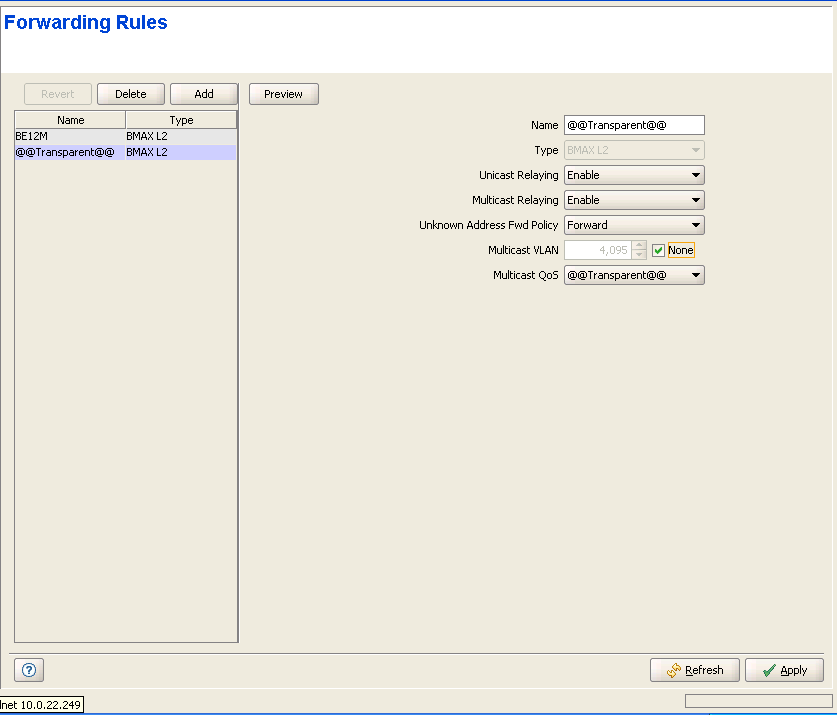
The Forwarding Rule defines the features that affect forwarding and relaying of data. Data in L2 and VoIP services may be switched only between the Services that share the same Forwarding Rule. Data in PPPoE service can pass only between the subscriber and an Access Concentrator behind the Base Station/Micro Base Station.
The Forwarding Rules page displays a list of all Forwarding Rules in the database of the Base Station/Micro Base Station. It also enables modifying existing Forwarding Rules, deleting Forwarding Rules from the device, and defining new Forwarding Rules. The device can hold up to 255 Forwarding Rules.
|
The Forwarding Rules page comprises two sections: The Forwarding Rules Table (on the left side) and the Forwarding Rule Editor section (on the right side). The Editor is available only when either selecting a Forwarding Rule in the Forwarding Rules Table for viewing/modifying its parameters, or adding a new Forwarding Rule.
The Forwarding Rules table provides the following details for each of the existing Forwarding Rules:
Parameter |
Description |
Name |
The Forwarding Rule Name. |
Type |
The Forwarding Rule Service Type: L2, PPPoE or VoIP. |

|
To view the details of a Forwarding Rule: |
Select a Forwarding Rule's entry. The current Forwarding Rule configuration details will be displayed on the right side of the page. You can click on the Preview button to view the parameters of the Forwarding Rule, including the details of the relevant QoS Profile.
|
To delete Forwarding Rule(s) from the device: |
Select one or several Forwarding Rule entries, click on the Delete button and then click Apply to remove the selected Forwarding Rule(s) from the Base Station/Micro Base Station. If you want to cancel the requested delete operation before clicking Apply, click on the Revert button.
|
To add a new Forwarding Rule: |
Click on the Add button. The Forwarding Rule Editor will be displayed on the right side of the page. To add a new Forwarding Rule to the database of the Base Station/Micro Base Station, fill in the necessary parameters and click Apply. You can click on the Preview button to view the parameters of the Forwarding Rule, including the details of the relevant QoS Profile, before applying the change.
|
To modify an existing Forwarding Rule: |
Select a Forwarding Rule's entry. The current Forwarding Rule configuration details will be displayed on the right side of the page, enabling modification of parameters. Click Apply to update the Forwarding Rule's configuration. You can click on the Preview button to view the parameters of the Forwarding Rule, including the details of the relevant QoS Profile, before applying the change.
Forwarding Rule Configuration Parameters:
Parameter |
Description |
Name |
A Forwarding Rule Name consists of up to 32 printable characters. Note that the name of the Transparent Forwarding Rule (@@Transparent@@) cannot be modified. |
Type |
The Service Type: L2, PPPoE or VoIP. The Service Type of an existing Forwarding Rule cannot be modified. |
Unicast Relaying |
The Unicast Relaying parameter is applicable only to L2 Services. The Unicast Relaying parameter determines whether the AU/Micro Base Station performs unicast relaying. When the Unicast Relaying parameter is enabled, unicast packets originating from devices on the wireless link can be transmitted back to the wireless link devices. If disabled, these packets are not sent to the wireless link even if they are intended for devices on the wireless link. |
Multicast Relaying |
The Multicast Relaying parameter is applicable only to L2 Services. The Multicast Relaying parameter determines whether the AU/Micro Base Station performs multicast relaying. When the Multicast Relaying parameter is enabled, multicast packets originating from devices on the wireless link are transmitted by the AU/Micro Base Station back to the wireless link devices, as well as to the backbone. If disabled, these packets are sent only to the backbone and are not sent back to the wireless link. |
Unknown Address Fwd Policy |
The Unknown Address Forwarding Policy parameter is applicable only to L2 Services.The Unknown Address Forwarding Policy parameter determines the mode of controlling the flow of information from the backbone to the wireless media. Select from the following options: • Reject: The AU/Micro Base Station will transmit unicast packets only to those addresses that the AU/Micro Base Station knows to exist on the wireless link side. • Forward: Enables the transmission of all packets, except unicast packets sent to addresses that the AU/Micro Base Station recognizes as being on its wired backbone side. |
Multicast VLAN |
The Multicast VLAN ID parameter is applicable only to Services assigned to SUs with SW version below 2.0. The Multicast VLAN ID is the VLAN ID to be attached to multicast messages in order to enable full support of the VLAN feature by SUs with SW version below 2.0. In SUs with SW version below 2.0, it was necessary to use behind the SU a VLAN switch with binding capability to support multiple VLAN IDs. The VLAN switch was responsible for duplicating all the packets to the correct ports according to the multicast connection, this required switch pre-configuration. If a VLAN switch with binding capability was not used, only a single VLAN ID behind the SU could be supported, and this VLAN ID has to be identical to the multicast VLAN ID. In the current version, all packets received from the wireless port over a multicast connection are transmitted by the SU several times to the Ethernet port, each time with a different VLAN ID, taken from the VLAN ID list supplied by the NPU/Micro Base Station. Available values are in the range of 0 to 4094, None (4095) or 4096 (non configurable) for the Transparent Forwarding Rule (@@Transparent@@). |
Multicast QoS |
The QoS Profile to be used for multicast and broadcast messages. The drop-down menu includes all QoS Profiles that are available in the database of the Base Station/Micro Base Station. Place the cursor on the Multicast QoS title (it will become blue) and click to open the QoS Profiles page, displaying the detailes of the currently selected QoS Profile. |
Click on the Preview button to display a preview of the new/modified Forwarding Rule, including complete details of the selected Multicast QoS Profile.
|
|

