QoS Profiles Page
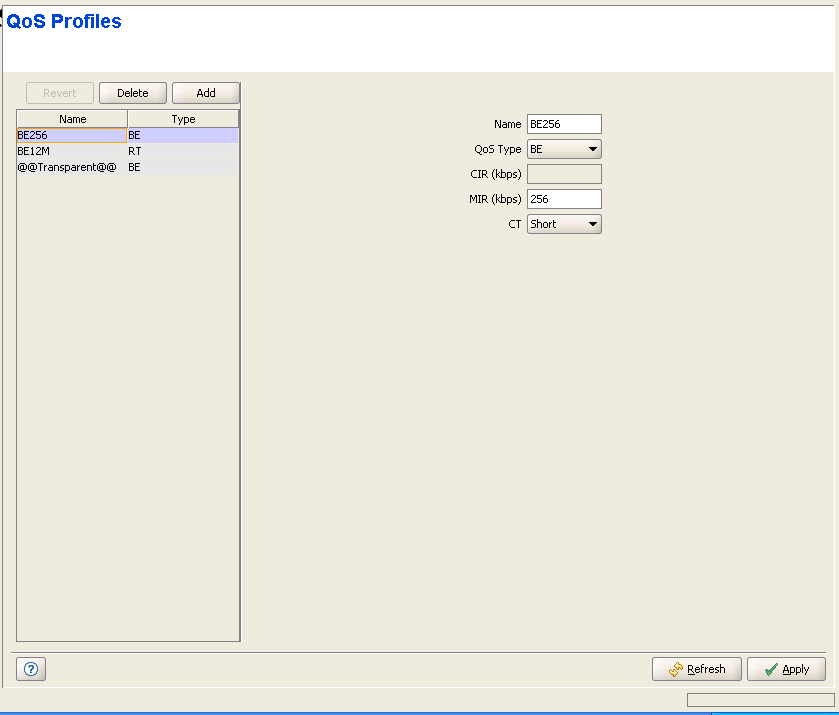
The QoS Profiles page displays a list of all QoS Profiles in the database of the Base Station/Micro Base Station. It also enables modifying existing QoS Profiles, deleting QoS Profiles from the device, and defining new QoS Profiles. The device can hold up to 255 QoS Profiles.
|
The QoS Profiles page comprises two sections: The QoS Profiles Table (on the left side) and the QoS Profile Editor section (on the right side). The Editor is available only when either selecting a QoS Profile in the QoS Profiles Table for viewing/modifying its parameters, or adding a new QoS Profile.
The QoS Profiles table provides the following details for each of the existing QoS Profiles:
Parameter |
Description |
Name |
The QoS Profile Name. |
Type |
The QoS Type: BE, NRT, RT or CG. |

|
To view the details of a QoS Profile: |
Select a QoS Profile's entry. The current QoS Profile configuration details will be displayed on the right side of the page.
|
To delete QoS Profile(s) from the device: |
Select one or several QoS Profile entries, click on the Delete button and then click Apply to remove the selected QoS Profile(s) from the Base Station/Micro Base Station. If you want to cancel the requested delete operation before clicking Apply, click on the Revert button.
|
To add a new QoS Profile: |
Click on the Add button. The QoS Profile Editor will be displayed on the right side of the page. To add a new QoS Profile to the database of the Base Station/Micro Base Station, fill in the necessary parameters and click Apply.
|
To modify an existing QoS Profile: |
Select a QoS Profile's entry. The current QoS Profile configuration details will be displayed on the right side of the page, enabling modification of parameters. Click Apply to update the QoS Profile's configuration.
QoS Profile Configuration Parameters:
Parameter |
Description |
Name |
A QoS Profile Name consists of up to 32 printable characters. |
QoS Type |
The QoS Type: BE, NRT, RT or CG. |
CIR (kbps) |
Applicable only to RT and NRT QoS Types. The information transfer rate that the system is committed to transfer under normal conditions. The rate is averaged over a minimum increment of time, which is defined by the CT parameter. The range is from 1 to 12,000 Kbps. MIR cannot be lower than CIR (applicable to NRT QoS type). |
MIR (kbps) |
Applicable only to NRT and BE QoS Types. The maximum information rate that the system will allow for the connection. The rate is averaged over a minimum increment of time, which is defined by the CT parameter. The range is from 1 to 12,000 Kbps. |
CT |
Applicable for RT, NRT and BE QoS Types. The CT (Committed Time) parameter defines the time window over which the information rate is averaged to ensure compliance with the CIR or MIR parameter. It is used also to prioritize bandwidth allocation to connections, where for each QoS Type, connections with a shorter CT get higher priority. The available options are Short, Medium, and Long. The actual value in milliseconds for each of the three options varies according to the QoS type. |
PS (bytes) |
Applicable only to CG QoS Type. The Packet Size parameter defines the amount of data in bytes that is expected for each grant. The range is from 64 to 1550 (bytes). |
SI (ms) |
Applicable only to CG QoS Type. The Sample Interval parameter defines the time in milliseconds between two successive grants (inter arrival time). The range is from 5 to 100 (milliseconds), using increments of 5 milliseconds. |
|
|

